

Discover community conversations
GraveSpaces
Be there when the conversation starts.
Discover live and upcoming X Spaces from ecosystem hosts, join the conversation on X, and catch up with available recordings, transcripts and highlights. Follow hosts and choose how to hear when they go live.
Live listening happens on X. Available recordings, transcripts and highlights live on the Space page.
What it is
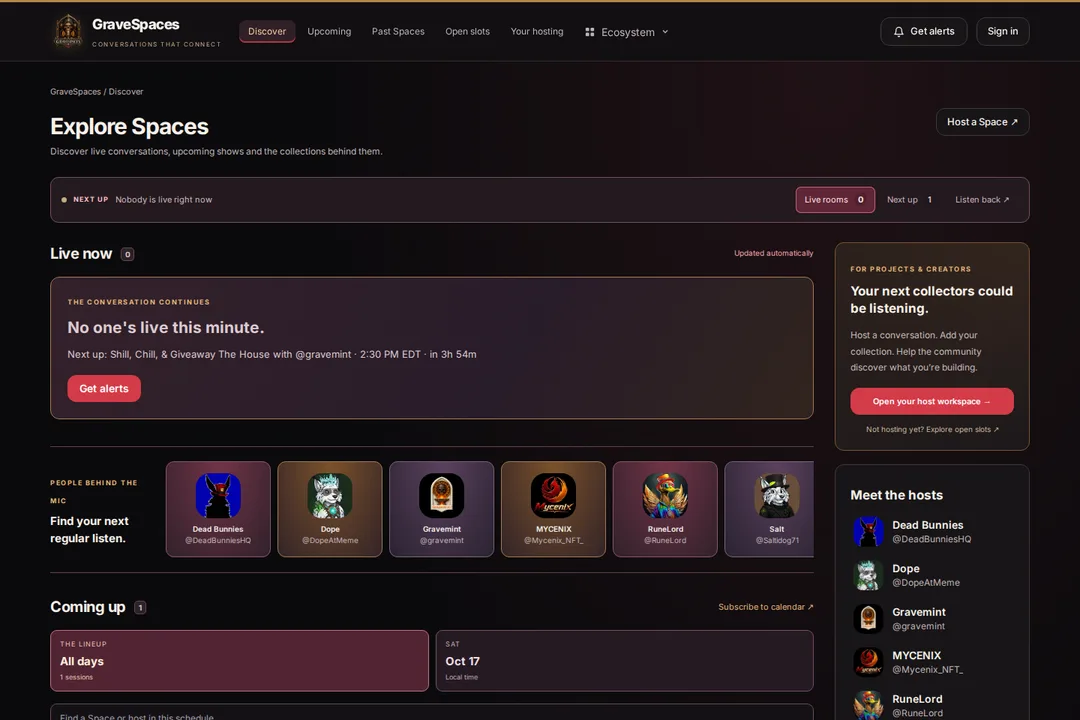
GraveSpaces brings ecosystem X Spaces into one place: who is live, what is coming up, and which conversations you can catch up on. Browse the programme, find a host, and open the Space on X to listen or take part.
After a session ends, its page can bring together the replay, approved highlights, a recording and a transcript where available. Collection links help you explore the project behind the conversation.
Three steps to start
- 1
Find a conversation
Browse live rooms, the upcoming schedule or the archive. Explore hosts to find the people you want to hear from.
- 2
Open the Space on X
Choose Join to listen on X. Upcoming sessions include calendar options so you can plan ahead.
- 3
Keep up with your hosts
Sign in with GraveID to follow hosts and choose alerts. Come back for available replays and highlights after the conversation ends.
Everything it can do
Find your next listen
- Live conversations — see which listed hosts are on air and open their Space on X
- Upcoming schedule — browse by day or search for a Space or host, with times shown in your time zone
- Host discovery — explore host profiles and their past conversations
- Calendar subscriptions — keep upcoming Spaces alongside the rest of your schedule
Catch up afterwards
- Past Spaces — browse the archive and follow replay links when provided
- Recording playback — listen on GraveSpaces when a recording is available
- Transcripts and time links — read along and jump into available recordings
- Highlights — read approved summaries where they have been published
Stay connected
- Follow hosts — use your GraveID account to keep track of the people you care about
- Choose your alerts — email, browser push and in-app options where enabled; browser push depends on device support and permission
- Collections behind the conversation — open linked GraveMint collections directly from a Space
- Host submissions — apply to host, submit upcoming sessions or request an available slot for review
Who it’s for
For listeners
- Find ecosystem conversations without searching individual timelines
- See what is live and join the matching Space on X
- Plan ahead with the upcoming schedule and calendar
- Catch up with available recordings, transcripts and highlights
For hosts and projects
- Give your community one place to find your sessions
- Apply to host and submit sessions for review
- Help listeners discover the collection behind your project
- Build a home for past conversations alongside upcoming shows
Questions people actually ask
Where do I join a live Space?
The Join link opens the matching Space on X. GraveSpaces helps you discover the conversation; X hosts the live audio and controls who can listen or speak.
Do I need a wallet to browse?
No. You can browse public Spaces, schedules and available replays without connecting a wallet. Sign in with GraveID for account features such as following hosts.
Can I listen after a Space ends?
Where available, the Space page offers a replay link or recording playback. Some sessions also have a transcript and published highlights. These are not available for every Space.
How do alerts work?
Choose your alert preferences in GraveSpaces. Email alerts require confirmation, and browser push requires a supported browser and your permission. Availability depends on which channels are enabled.
Can I host or submit a Space?
Open Host a Space in GraveSpaces and sign in. Host applications, session submissions and slot requests go through review before appearing publicly.
Is GraveSpaces a separate app?
Yes. The web app lives at spaces.deads.io. It uses GraveID for account features and links to ecosystem products such as GraveMint when a collection is attached to a Space.
Things worth knowing
Live audio runs on X
Joining and speaking happen on X and depend on its availability and access rules. GraveSpaces is a curated discovery service, so it does not list every Space on X.
Catch-up content varies by session
Recordings, transcripts, replay links and highlights depend on availability, recording permissions and publication. A past Space may have only some of these.
Where it fits


Find your next conversation.
Join a live Space, plan your next listen or catch up on what you missed.